A Training Management System (TMS) is not just about improving productivity—it is also an important compliance requirement for training providers.
The Training and Adult Education Industry Transformation Map (TAE ITM), launched in February 2018, encourages training providers to improve productivity and operational efficiency through the adoption of digital tools.
At the centre of this digital transformation is our TMS, which helps training providers streamline key processes such as enrolment, course scheduling, billing and fee collection, while also supporting compliance with SSG requirements.
This guide explains what a TMS does, why it differs from an LMS in the Singapore context, what features to look for, and how to plan a transition from manual administration.
What Is a Training Management System (TMS)?
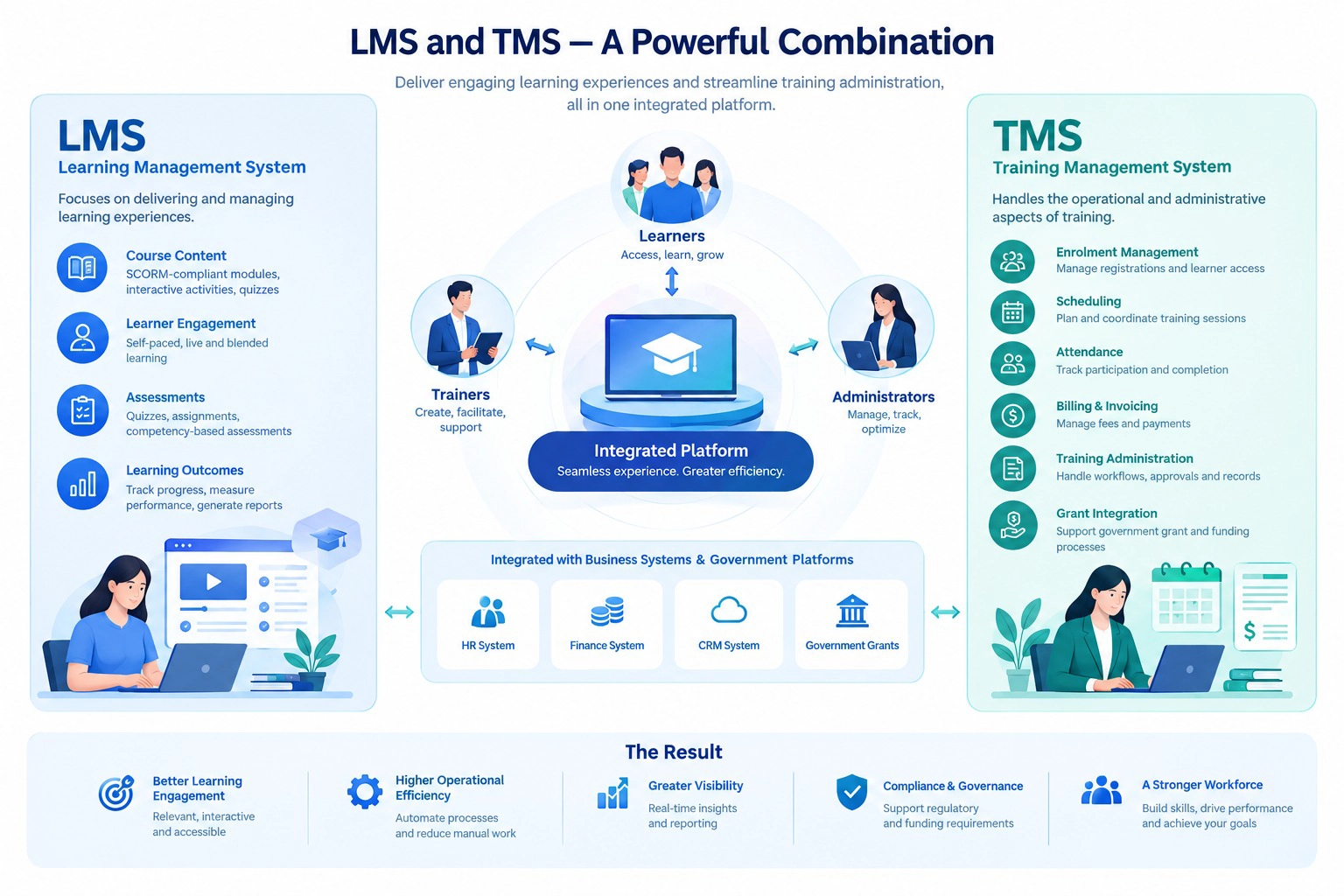
TMS vs LMS — The Key Difference for Singapore Training Providers
The terms LMS and TMS describe different emphases, although platforms can combine both. In Singapore, the distinction matters.
A Learning Management System (LMS) handles the learner experience: hosting e-learning content, delivering SCORM courses, running assessments, and tracking individual learning progress.
A Training Management System (TMS) handles the back-office administration: course scheduling, venue management, trainee enrolment, attendance tracking, government grant calculations, and regulatory compliance reporting.
Registered Training Providers (RTPs), previously Authorised Training Organisations (ATOs), should evaluate which learning delivery and administrative capabilities their programmes require. An LMS without relevant TMS integration may require a separate administrative workflow. A TMS focused on administration may need to connect to separate e-learning tools.
| Function | LMS | TMS |
|---|---|---|
| E-learning content delivery | Yes | Usually separate |
| SCORM course hosting | Yes | Usually separate |
| Online assessments and quizzes | Yes | Usually separate |
| Course scheduling and venue management | Usually separate | Yes |
| Trainee enrolment and NRIC/FIN verification | Usually separate | Yes |
| SSG/SWDA grant calculation | Usually separate | Yes |
| TPGateway API data submission | Usually separate | Yes |
| Attendance tracking (QR/Singpass) | Usually separate | Yes |
| Course certification | Yes | Yes |
| Competency and learning roadmap | Yes | Usually separate |
The ideal solution for Singapore training providers is a platform that combines both LMS and TMS capabilities, eliminating double-entry and ensuring that the data flowing to SWDA through TPGateway originates from the same system where learners complete their training.
Why the Distinction Matters for SSG-Funded Course Administration
When you run SSG-funded courses, relevant data, such as enrolment, attendance and assessment outcomes, must be handled according to applicable TPGateway requirements. If your LMS and TMS are separate platforms, your operations team must manually transfer data between them: exporting completion records from the LMS, reformatting them, and uploading them to the TMS or directly to TPGateway.
This double-entry creates three risks:
Data errors — manual transfers introduce mistakes in NRICs, attendance times, and assessment scores
Audit exposure — manual transfer can make reconciliation and audit evidence harder to manage
Delayed grant disbursements — errors in submission data delay relevant submissions or funding processes, directly affecting cash flow
Why Singapore Training Providers Need a TMS with TPGateway Integration
The SSG/SWDA Compliance Mandate
Published TPGateway guidance requires relevant providers offering funded courses to use a TMS linked to the agency’s systems, subject to listed exemptions. Providers should review the current requirement and integration scope.
Following the July 2026 merger of SSG and WSG into SWDA, providers should check current TPGateway guidance and ask their vendor about any relevant API changes.
The 4 Core TPGateway Data Flows
When evaluating an integration, ask which of these data flows are supported in the proposed configuration:
1. Course Runs and Scheduling
Pushing course schedules, session details, module structures, fees, and trainer assignments directly to TPGateway via API. Confirm how course-run changes are submitted and reconciled.
2. Enrolment and Grant Calculation
Verifying trainee NRIC/FIN, validating company-sponsored versus self-sponsored status, and supporting applicable funding eligibility and calculation workflows. Errors here delay funding or trigger clawbacks.
3. Attendance and Assessment Integration
Capturing digital attendance — increasingly through QR code check-in or Singpass verification — and submitting assessment outcomes to SWDA. Confirm any downstream record or certificate processes for the course type.
4. Audit Trail and Log Reliability
Storing API request/response logs, error handling records, and transaction histories so that your operations team can produce them during TPQA audits without scrambling through emails or spreadsheets.
The Cost of Manual CSV Uploads vs API-Driven Sync
Some training providers still use a semi-manual workflow: exporting data from their internal system, formatting it into CSV files, and bulk-uploading to TPGateway. Its suitability depends on the applicable requirements, but it can increase manual effort and reconciliation risk.
Review whether the data transfer is accurate, traceable and aligned with current requirements. An API integration can make relevant data available for timely submission — when a trainee checks in, that attendance record is available for submission without human intervention. Manual CSV uploads introduce lag, formatting errors, and gaps in the audit trail.
TPQA Audit Readiness
For TPQA preparation, consider how you can evidence:
Whether attendance data matches TPGateway submissions
Whether grant calculations are accurate and timely
Whether your system maintains a reliable log of all API transactions
Whether assessment results are submitted before certification is issued
Supported integrations can help maintain consistent records, but their scope and configuration should be checked. A disconnected workflow — where your team manually bridges the gap between systems — can create additional reconciliation work.
Key Features to Look for in a Singapore TMS
| Feature | Why It Matters | Must-Have vs Nice-to-Have |
|---|---|---|
| Native TPGateway API integration | Compliance requirement for funded training | Must-have |
| Automated SSG grant calculation (MCES, SFEC, SkillsFuture Credits) | Prevents calculation errors and delayed disbursements | Must-have |
| Digital attendance (QR code / Singpass) | Audit-compliant, eliminates paper sign-in sheets | Must-have |
| Digital credential support where applicable | Digital credential support where applicable; verify the issuer and course requirements | Verify for the course and credential process |
| Trainee NRIC/FIN verification | Validates trainee identity before enrolment submission | Must-have |
| Course scheduling and venue management | Core TMS function for face-to-face training | Must-have |
| Combined LMS + TMS in one platform | Eliminates double-entry between separate systems | Strongly recommended |
| Trainer assignment and management | Schedule trainers, track qualifications, ensure compliance | Nice-to-have |
| Automated fee and invoice management | Streamlines billing for sponsored and self-funded trainees | Nice-to-have |
| API transaction logging and error handling | Audit trail for TPQA reviews | Must-have |
How to Transition from Manual Admin to an Integrated TMS
Step 1: Assess Your Current Data Flow
Map out how training data currently moves through your organisation — from course scheduling through to TPGateway submission. Identify every manual step: spreadsheet exports, CSV formatting, copy-paste transfers, email-based approvals.
Step 2: Migrate from Spreadsheets or Legacy Systems
Most TMS vendors offer data migration support. Prepare your existing records — historical course runs, trainee databases, attendance logs, and certification records — in a structured format. Prioritise migrating active and upcoming course data first; historical records can follow.
Step 3: Go-Live and TPQA Compliance Verification
Before going live with government-funded course submissions, run a parallel period where you verify that API submissions match your expected data. Confirm that grant calculations are accurate, attendance records sync correctly, and assessment submissions trigger the expected downstream actions (Skills Passport updates, OpenCerts issuance). Your TMS vendor should support this verification process.
Get Started
The most effective way to evaluate a Training Management System is to see it handle your specific course administration workflows — including TPGateway submissions, grant calculations, and attendance tracking for your actual course structure.
Official references
- Ministry of Manpower — establishment of SWDA
- TPGateway — TMS integration and exemptions
- TPGateway — frequently asked questions
Scheme rules, system interfaces and product configuration can change. Confirm current requirements with the relevant agency and verify the exact integration scope for your programme.
Explore Wizlearn’s LMS and TMS or contact the team about your requirements.